Downlink TDoA RTLS Demo
Prepare for setup
LEAPS Manager application installed.
At least five LC14 devices.
Batteries or USB-C cables for powering the devices.
Recommended: clamp or tripod with a camera mount for attachment of the Anchor devices.
Optional: Putty, Teraterm, minicom or your favorite terminal application installed on your computer.
For users, the recommended starting point is either the latest release.
Setup time: less than 5 minutes
Overview
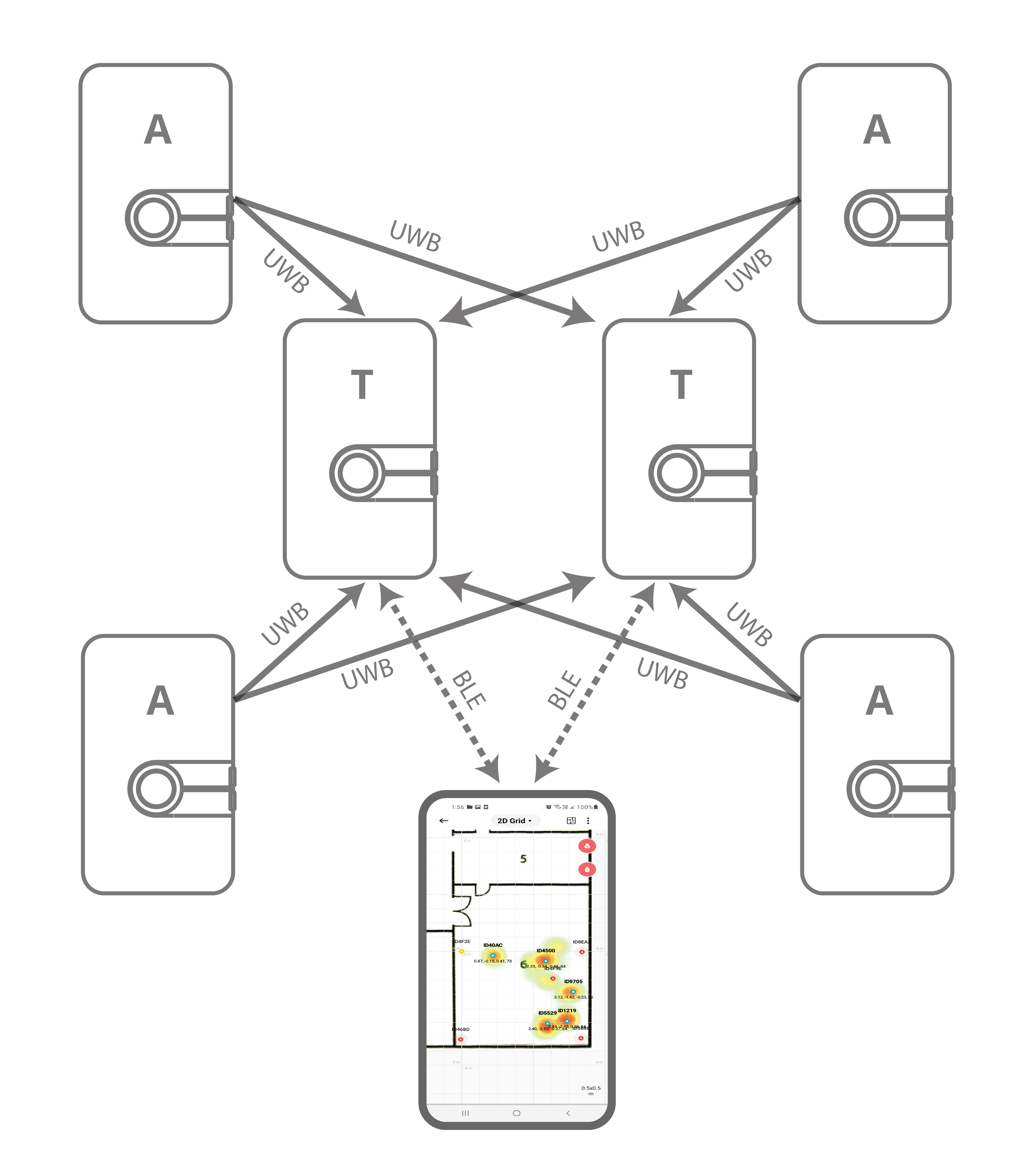
This setup demonstrates real-time navigation of an unlimited amount of Tags in receive-only mode with complete privacy using the Downlink Time Difference of Arrival (DL-TDoA) technology and demonstrates the LEAPS Manager application with Tag position navigation.
Typical applications: Indoor navigation with mapping, autonomous robot and vehicle navigation, asset tracking with location data being sent through another communication channel.
Setup instructions
Power ON the devices.
The statically mounted devices will function as Anchors, providing location information to the Tags.
The moving devices will function as Tags configured in navigation mode in receive mode only, with no transmission (GNSS-like mode).
There is no limit on the amount of Tags.
Configure using the Demo Selector in the LEAPS Manager:
2.1. Open the LEAPS Manager and select the Demo Selector from the main page.
2.2. select the Downlink TDoA RTLS.
2.3. A list of discovered devices via Bluetooth will appear on the list. Swipe down to update the list if needed.
2.4. Select the devices that will be used for the demo. The anchors and tags on the top side indicate the amount of devices needed for the demo.
2.5. Press the SAVE to configure the device(s) into the LEAPS RTLS mode, networking profile 2 (supports TWR+UL / DL-Data, DL-TDoA).
2.6. A pop-up window Anchor Configuration will appear to offer the options to configure the Anchor’s positions. select the Manual, Auto positioning or Keep current position depending on the need, then Press the OK.
2.7. Please check visually that the RED LED blinks when the device starts.

When the devices are configured successfully, the LEAPS Demo Network window will appear with a list of configured nodes.
Recommended: Use the alarm feature to identify the device, and move it to the correct physical location.
Open the Grid, located at the top drop down menu (select Network Details), or tap the location icon for visualization of the devices and their positions.
The LEAPS Manager configured to profile 2 (supports TWR+UL / DL-Data, DL-TDoA) but in auto state. So we can see the tag’s coordinates on the map.
Please refer to the LEAPS Manager for more details on how to use the application to configure and visualize the nodes and network.
Advanced setup
Get ready for the advanced setup! We’ll tap into the terminal’s power to help you configure your device like a pro. Just follow these steps and you’ll be all set.
Use a USB-C Data Cable to connect the USB-C Data Port 1 or USB-C Data Port 2 of devices to your PC.
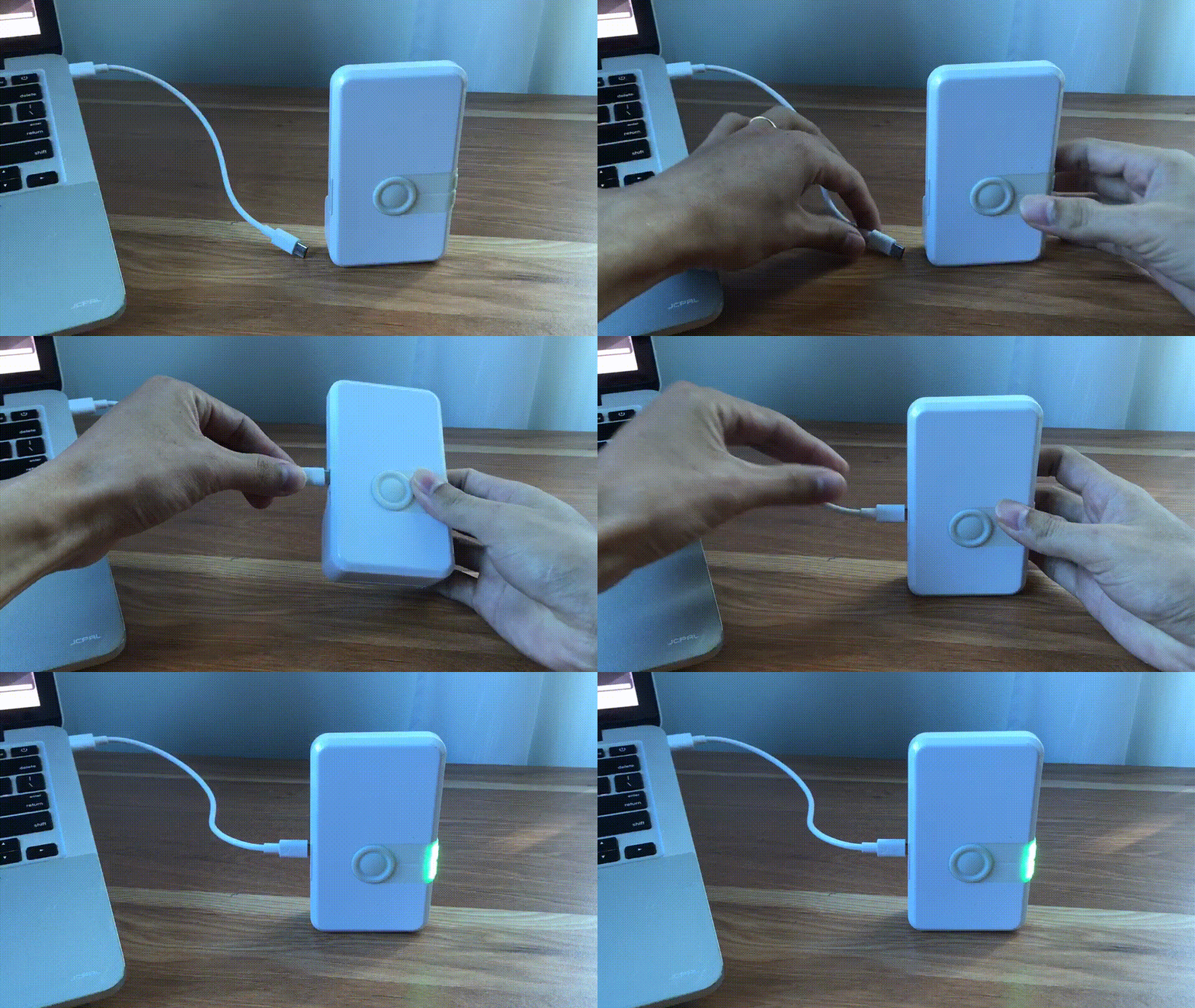
Connect to a serial port using your desired terminal application, such as Putty, Teraterm, Minicom, or your favorite terminal application. We need to configure the baud rate to 115200.
For example use Minicom, on Ubuntu (Linux):
minicom -b 115200 -D /dev/ttyACM0
Press double enter on the shell console to access the command line control system
For example open /dev/ttyACM0 and press double enter, on Ubuntu (Linux):
leaps@leaps:~$ minicom -b 115200 -D /dev/ttyACM0

  Low Energy Accurate Positioning System

  Copyright :  2016-2025 LEAPS
  License   :  Please visit https://www.leapslabs.com/leaps-rtls-license
  Compiled  :  Oct 15 2026 09:42:20 (v1.2.1-4f9295)

  Help      :  ? or help

  FOR DEMO PURPOSE ONLY, NOT FOR SALE.
  DEVICE RUNTIME IS LIMITED TO 48 HOURS. RESET THE DEVICE TO RECOVER IT.

  leaps>
Configure for each device, do the following steps:
Optional: Reset devices to default, run the
frstcommand.$ leaps> frst frst okMonitor and wait for the device to reset successfully. Then press double enter to access the command line control system.
Use the
nps 2command to configure profile 2 (supports TWR+UL / DL-Data, DL-TDoA) for each device.$ leaps> nps 2 nps: ok
Use the
niscommand to configure all devices in a network.$ leaps> nis 0x1234 nis: ok
Then, it is neccessary to reset the device need to reset the device to update the configuration. Use the
resetcommand to reset the device.$ leaps> reset reset ok
Note
In this example, we will configure an anchor with enable initiator, 3 anchors, and a tag.
Configure the mode for each anchor and tag.
To configure an anchor with enable initiator, use the
nmicommand to configure a device.$ leaps> nmiThen, the device will reset, and to access the command line control system again, press double enter.
To configure 3 anchors, use the
nmacommand to configure 3 devices to anchor mode, but do not enable initiator.$ leaps> nmaThen, the device will reset, and to access the command line control system again, press double enter.
To configure a tag, use the
nmtcommand to configure a device to tag mode$ leaps> nmtThen, the device will reset, and to access the command line control system again, press double enter.
Configure the clock reference for one of the anchors.
At least one anchor is configured.
To configure an anchor with enable clock reference, use the
acs crcommand to configure a device.$ leaps> acs cr 1Then, it is neccessary to reset the device need to reset the device to update the configuration. Use the
resetcommand to reset the device.$ leaps> reset reset ok
Configure the actual position for each anchor.
To get the position use
pgcommand and to set the position usepscommand for each anchor.In this example, we will set up 4 anchors:
leaps> ps 0 7500 1550 ps: ok leaps> pg pg: x:0 y:7500 z:1550 qf:100 leaps>leaps> ps 5500 7500 1550 ps: ok leaps> pg pg: x:5500 y:7500 z:1550 qf:100 leaps>leaps> ps 5500 4000 1500 ps: ok leaps> pg pg: x:5500 y:4000 z:1500 qf:100 leaps>leaps> ps 0 4000 1550 ps: ok leaps> pg pg: x:0 y:4000 z:1550 qf:100 leaps>Note
The device must be configured to accurately reflect its actual physical location.
Additionally, LEAPS Manager can be used to visualize the devices and their locations.
Configuration for each tag allows the use of DL-TDoA technology for measurement.
To configure, use the
tcs mode 2command for a tag.$ leaps> tcs mode 2 tcs: ok
Then, it is neccessary to reset the device to update the configuration. Use the
resetcommand to reset the device.$ leaps> reset reset ok
By default normal update rate is 0.1 s/ 10 Hz and stationary update rate is 5.0 s/ 0.2 Hz. To increase speed, use
urscommand.
For example, configure normal update rate to 0.1 s/ 10 Hz and, stationary update rate is 0.1 s/ 10 Hz. Run the following command:
$ leaps> urs 1 1
urs: ok
Optional: In steps 5, 6, 7, 8 and, 9 can use the
si(System Information) command to verify whether the mode, profile, and network configurations are correct.
For example on 4 anchors and a tag:
mode: ani
panid=x1234
prof=2
cr=1leaps> nps 2 nps: ok leaps> nis 0x1234 nis: ok leaps> acs cr 1 nis: ok leaps> nmi Low Energy Accurate Positioning System Copyright : 2016-2025 LEAPS License : Please visit https://www.leapslabs.com/leaps-rtls-license Compiled : Oct 15 2026 09:42:20 (v1.2.1-4f9295) Help : ? or help FOR DEMO PURPOSE ONLY, NOT FOR SALE. DEVICE RUNTIME IS LIMITED TO 48 HOURS. RESET THE DEVICE TO RECOVER IT. leaps> si [000013.974 INF] release: LEAPS RTLS v1.2.1-4f9295 (fira) [000013.975 INF] sys: main main_ver=x02070101 cfg_ver=x01040000 batt=empty:0mV:NoCharger board=LC14_B prod=LC14_B pwr_cnt=0 rst_cnt=2 [000013.976 INF] uwb: ch9 prf64 plen128 pac8 txcode11 rxcode11 baud6800 phrmodeext phrratestd sfdtypeieee4a sfdto129 stsmodeoff stslen64 pdoamodem0 [000013.976 INF] uwb: tx_pwr=x34/xC6C6C6C6 sts:shr:phr:data=22.6:22.6:22.6:22.6[dB] cpl=FCC/ETSI pgcnt=236 temp=25 [000013.977 INF] uwb: lna=1 pa=0 rf1=1 rf2=0 xtaltrim=32 tx_delay=16422 rx_delay=16422 [000013.980 INF] uwb: panid=x1234 panid_mask=xFFFF zone=255 addr=xDECAED5BC8B1468D [000013.998 INF] mode: ani (act,-) [000013.999 INF] uwbmac: connected prof=2 (manual) [000013.999 INF] uwbmac: bh disconnected [000014.000 INF] cfg: sync=0 fwup=1 ble=1 leds=1 init=1 uab=1 bh=auto bh_stat=off cr=1 upd_rate_stat=30 label=ID468D [000014.023 INF] enc: off [000014.024 INF] ble: addr=F3:D9:66:75:93:EB leaps>
mode: an
panid=x1234
prof=2leaps> nps 2 nps: ok leaps> nis 0x1234 nis: ok leaps> nma Low Energy Accurate Positioning System Copyright : 2016-2025 LEAPS License : Please visit https://www.leapslabs.com/leaps-rtls-license Compiled : Oct 15 2026 09:42:20 (v1.2.1-4f9295) Help : ? or help FOR DEMO PURPOSE ONLY, NOT FOR SALE. DEVICE RUNTIME IS LIMITED TO 48 HOURS. RESET THE DEVICE TO RECOVER IT. leaps> si [000010.749 INF] release: LEAPS RTLS v1.2.1-4f9295 (fira) [000010.750 INF] sys: main main_ver=x02070101 cfg_ver=x01040000 batt=empty:0mV:NoCharger board=LC14_B prod=LC14_B pwr_cnt=0 rst_cnt=2 [000010.751 INF] uwb: ch9 prf64 plen128 pac8 txcode11 rxcode11 baud6800 phrmodeext phrratestd sfdtypeieee4a sfdto129 stsmodeoff stslen64 pdoamodem0 [000010.751 INF] uwb: tx_pwr=x34/xCECECECE sts:shr:phr:data=23.4:23.4:23.4:23.4[dB] cpl=FCC/ETSI pgcnt=229 temp=25 [000010.752 INF] uwb: lna=1 pa=0 rf1=1 rf2=0 xtaltrim=32 tx_delay=16423 rx_delay=16423 [000010.755 INF] uwb: panid=x1234 panid_mask=xFFFF zone=255 addr=xDECAE4F84AA54F9E [000010.770 INF] mode: an (act,-) [000010.771 INF] uwbmac: connected prof=2 (manual) [000010.771 INF] uwbmac: bh disconnected [000010.798 INF] cfg: sync=0 fwup=1 ble=1 leds=1 init=0 uab=1 bh=auto bh_stat=off cr=0 upd_rate_stat=30 label=ID4F9E [000010.798 INF] enc: off [000010.798 INF] ble: addr=D8:70:8B:16:3B:EE leaps>
mode: an
panid=x1234
prof=2leaps> nps 2 nps: ok leaps> nis 0x1234 nis: ok leaps> nma Low Energy Accurate Positioning System Copyright : 2016-2025 LEAPS License : Please visit https://www.leapslabs.com/leaps-rtls-license Compiled : Oct 15 2026 09:42:20 (v1.2.1-4f9295) Help : ? or help FOR DEMO PURPOSE ONLY, NOT FOR SALE. DEVICE RUNTIME IS LIMITED TO 48 HOURS. RESET THE DEVICE TO RECOVER IT. leaps> si [000005.120 INF] release: LEAPS RTLS v1.2.1-4f9295 (fira) [000005.120 INF] sys: main main_ver=x02070101 cfg_ver=x01040000 batt=empty:0mV:NoCharger board=LC14_B prod=LC14_B pwr_cnt=0 rst_cnt=2 [000005.121 INF] uwb: ch9 prf64 plen128 pac8 txcode11 rxcode11 baud6800 phrmodeext phrratestd sfdtypeieee4a sfdto129 stsmodeoff stslen64 pdoamodem0 [000005.122 INF] uwb: tx_pwr=x34/xCECECECE sts:shr:phr:data=23.4:23.4:23.4:23.4[dB] cpl=FCC/ETSI pgcnt=238 temp=25 [000005.123 INF] uwb: lna=1 pa=0 rf1=1 rf2=0 xtaltrim=32 tx_delay=16417 rx_delay=16417 [000005.126 INF] uwb: panid=x1234 panid_mask=xFFFF zone=255 addr=xDECA229121E05886 [000005.140 INF] mode: an (act,-) [000005.141 INF] uwbmac: connected prof=2 (manual) [000005.142 INF] uwbmac: bh disconnected [000005.169 INF] cfg: sync=0 fwup=1 ble=1 leds=1 init=0 uab=1 bh=auto bh_stat=off cr=0 upd_rate_stat=30 label=ID5886 [000005.169 INF] enc: off [000005.170 INF] ble: addr=FD:3F:4A:2F:BD:F0 leaps>
mode: an
panid=x1234
prof=2leaps> nps 2 nps: ok leaps> nis 0x1234 nis: ok leaps> nma Low Energy Accurate Positioning System Copyright : 2016-2025 LEAPS License : Please visit https://www.leapslabs.com/leaps-rtls-license Compiled : Oct 15 2026 09:42:20 (v1.2.1-4f9295) Help : ? or help FOR DEMO PURPOSE ONLY, NOT FOR SALE. DEVICE RUNTIME IS LIMITED TO 48 HOURS. RESET THE DEVICE TO RECOVER IT. leaps> si [000010.064 INF] release: LEAPS RTLS v1.2.1-4f9295 (fira) [000010.064 INF] sys: main main_ver=x02070101 cfg_ver=x01040000 batt=empty:0mV:NoCharger board=LC14_B prod=LC14_B pwr_cnt=0 rst_cnt=2 [000010.066 INF] uwb: ch9 prf64 plen128 pac8 txcode11 rxcode11 baud6800 phrmodeext phrratestd sfdtypeieee4a sfdto129 stsmodeoff stslen64 pdoamodem0 [000010.067 INF] uwb: tx_pwr=x34/xEEEEEEEE sts:shr:phr:data=26.5:26.5:26.5:26.5[dB] cpl=FCC/ETSI pgcnt=245 temp=25 [000010.068 INF] uwb: lna=1 pa=0 rf1=1 rf2=0 xtaltrim=32 tx_delay=16427 rx_delay=16427 [000010.070 INF] uwb: panid=x1234 panid_mask=xFFFF zone=255 addr=xDECA7A20DFE04F2E [000010.090 INF] mode: an (act,-) [000010.091 INF] uwbmac: connected prof=2 (manual) [000010.091 INF] uwbmac: bh disconnected [000010.092 INF] cfg: sync=0 fwup=1 ble=1 leds=1 init=0 uab=1 bh=auto bh_stat=off cr=0 upd_rate_stat=30 label=ID4F2E [000010.113 INF] enc: off [000010.114 INF] ble: addr=C8:D9:F3:F1:7D:CE leaps>
mode: tn
panid=x1234
prof=2leaps> nps 2 nps: ok leaps> nis 0x1234 nis: ok leaps> tcs mode 2 tcs: ok leaps> urs 1 1 urs: ok leaps> nmt Low Energy Accurate Positioning System Copyright : 2016-2025 LEAPS License : Please visit https://www.leapslabs.com/leaps-rtls-license Compiled : Oct 15 2026 09:42:20 (v1.2.1-4f9295) Help : ? or help FOR DEMO PURPOSE ONLY, NOT FOR SALE. DEVICE RUNTIME IS LIMITED TO 48 HOURS. RESET THE DEVICE TO RECOVER IT. leaps> si [000081.906 INF] release: LEAPS RTLS v1.2.1-4f9295 (fira) [000081.906 INF] sys: main main_ver=x02070101 cfg_ver=x01040000 batt=empty:0mV:NoCharger board=LC14_B prod=LC14_B pwr_cnt=0 rst_cnt=2 [000081.907 INF] uwb: ch9 prf64 plen128 pac8 txcode11 rxcode11 baud6800 phrmodeext phrratestd sfdtypeieee4a sfdto129 stsmodeoff stslen64 pdoamodem0 [000081.908 INF] uwb: tx_pwr=x34/xC6C6C6C6 sts:shr:phr:data=22.6:22.6:22.6:22.6[dB] cpl=FCC/ETSI pgcnt=232 temp=25 [000081.909 INF] uwb: lna=1 pa=0 rf1=1 rf2=0 xtaltrim=32 tx_delay=16425 rx_delay=16425 [000081.912 INF] uwb: panid=x1234(sys_cfg=x1234) panid_mask=xFFFF addr=xDECA2DA03CD01219 [000081.928 INF] mode: tn (act,rtdoa,np,le) [000081.929 INF] uwbmac: connected prof=2 (manual) [000081.929 INF] uwbmac: bh disconnected [000081.955 INF] cfg: sync=0 fwup=1 ble=1 leds=1 le=1 lp=0 uab=1 stat_det=1 (sens=2) mode=2 upd_rate_norm=1 upd_rate_stat=1 label=ID1219 [000081.956 INF] enc: off [000081.956 INF] ble: addr=CF:8F:04:42:CF:84 leaps>
Optional: To see a list of anchors in range and connected to the device, use the
lacommand.
For example on an anchor:
leaps> la
[000102.972 INF] AN: cnt=4 seq=x09
[000102.973 INF]     0) id=468D seat=0 clk_lvl=0 seens=0 rssi=-127 cl=0000000F nbr=0000000F pos=0.00:7.50:1.55 rate=0
[000102.973 INF]     1) id=4F2E seat=2 clk_lvl=1 seens=162 rssi=-55 cl=0000000F nbr=00000000 pos=0.00:4.00:1.55 rate=98
[000102.974 INF]     2) id=4F9E seat=1 clk_lvl=1 seens=181 rssi=-63 cl=0000000F nbr=00000000 pos=5.50:7.50:1.55 rate=99
[000102.975 INF]     3) id=5886 seat=3 clk_lvl=1 seens=128 rssi=-68 cl=0000000F nbr=00000000 pos=5.50:4.00:1.50 rate=99
[000102.976 INF]
leaps>
Once all configurations are complete, check the position of the Tag using the
lescommand.
For example on a Tag, the position will update and display real-time:
leaps> les
leaps> POS[2.66,4.36,0.00,100] 468D[0.00,7.50,1.55,100]=0.00 4F9E[5.50,7.50,1.55,100]=0.09 4F2E[0.00,4.00,1.55,100]=-1.47 5886[5.50,4.00,1.50,100]=-1.22
POS[2.65,4.36,0.00,100] 468D[0.00,7.50,1.55,100]=0.00 4F9E[5.50,7.50,1.55,100]=0.11 4F2E[0.00,4.00,1.55,100]=-1.46 5886[5.50,4.00,1.50,100]=-1.20
POS[2.66,4.33,0.00,100] 468D[0.00,7.50,1.55,100]=0.00 4F9E[5.50,7.50,1.55,100]=0.10 4F2E[0.00,4.00,1.55,100]=-1.50 5886[5.50,4.00,1.50,100]=-1.23
POS[2.66,4.33,0.00,100] 468D[0.00,7.50,1.55,100]=0.00 4F9E[5.50,7.50,1.55,100]=0.10 4F2E[0.00,4.00,1.55,100]=-1.50 5886[5.50,4.00,1.50,100]=-1.24
POS[2.65,4.35,0.00,100] 468D[0.00,7.50,1.55,100]=0.00 4F9E[5.50,7.50,1.55,100]=0.12 4F2E[0.00,4.00,1.55,100]=-1.48 5886[5.50,4.00,1.50,100]=-1.21
POS[2.65,4.36,0.00,100] 468D[0.00,7.50,1.55,100]=0.00 4F9E[5.50,7.50,1.55,100]=0.11 4F2E[0.00,4.00,1.55,100]=-1.47 5886[5.50,4.00,1.50,100]=-1.21
...
Now the system has been successfully set up and configured the system. Enjoy using it!
Here are some tips for fixing some issues related to the installation process:
Please check the version. We recommend using the latest official version found under Releases.
When Bluetooth and the LEDs are both disabled, users may erroneously perceive the board as non-functional. In this scenario, the quickest solution is to perform a factory reset (frst) command via the shell.
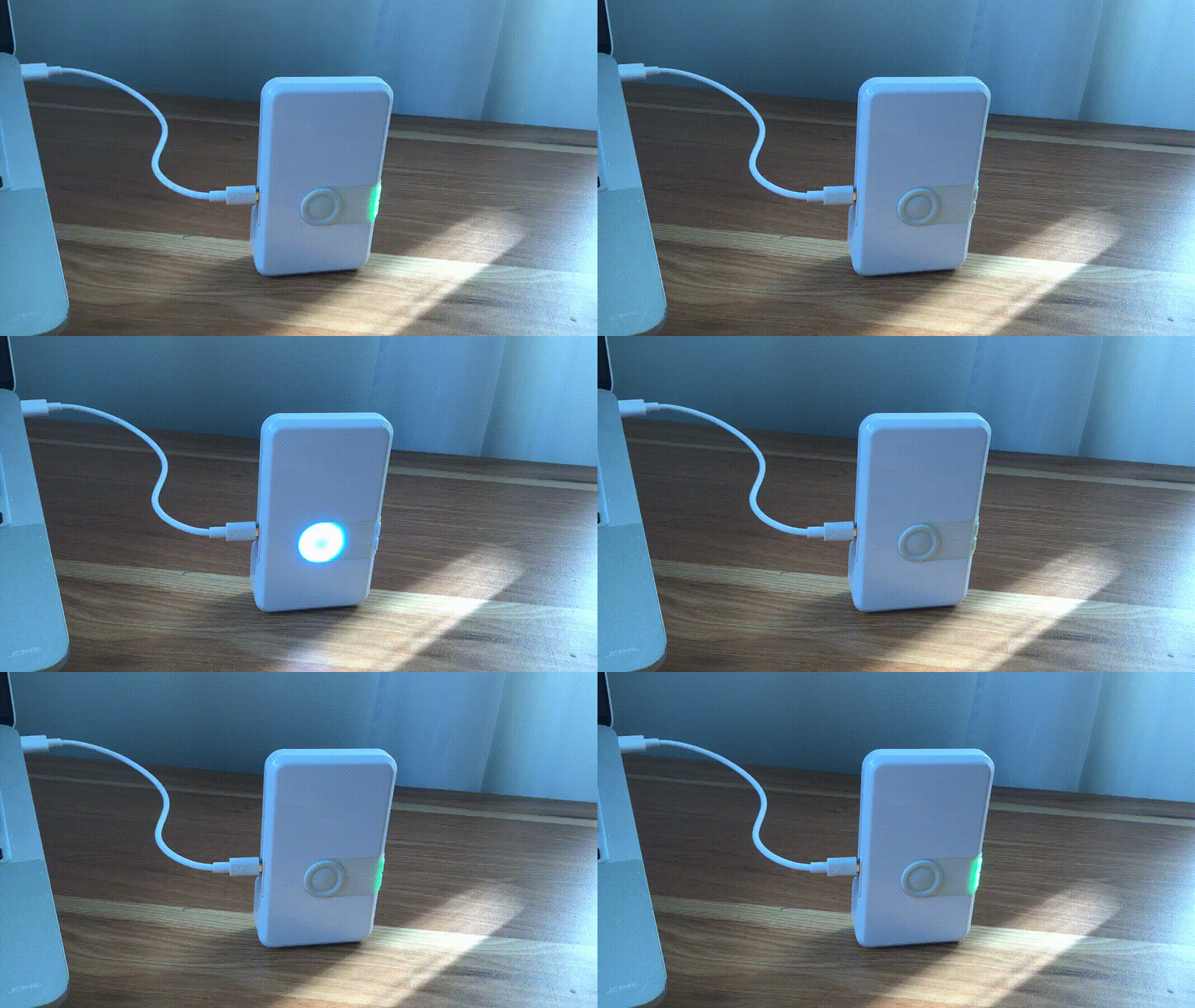
Use the Reset devices to default feature in Demo Selector on the LEAPS Manager when you don’t know the current state of the devices. Refer to the following GIF Image.
Note
Downlink TDoA RTLS Demo location data will be sent through another communication channel.
For any comments or questions about our products, we encourage you to visit our LEAPS Forum.
For detail of known limitation and issue list, please refer section Releases.