ダウンリンク TDoA RTLS デモ
セットアップの準備
LEAPS Manager アプリケーションがインストールされました。
少なくとも 5 つの LC14 デバイス。
デバイスに電力を供給するためのバッテリーまたは USB-C ケーブル。
推奨: アンカー デバイスの取り付けにはカメラ マウントを備えたクランプまたは三脚を使用します。
オプション: Putty、Teraterm、minicom、またはコンピュータにインストールされているお気に入りのターミナル アプリケーション。
For users, the recommended starting point is either the latest release.
セットアップ時間: 5 分未満
概要
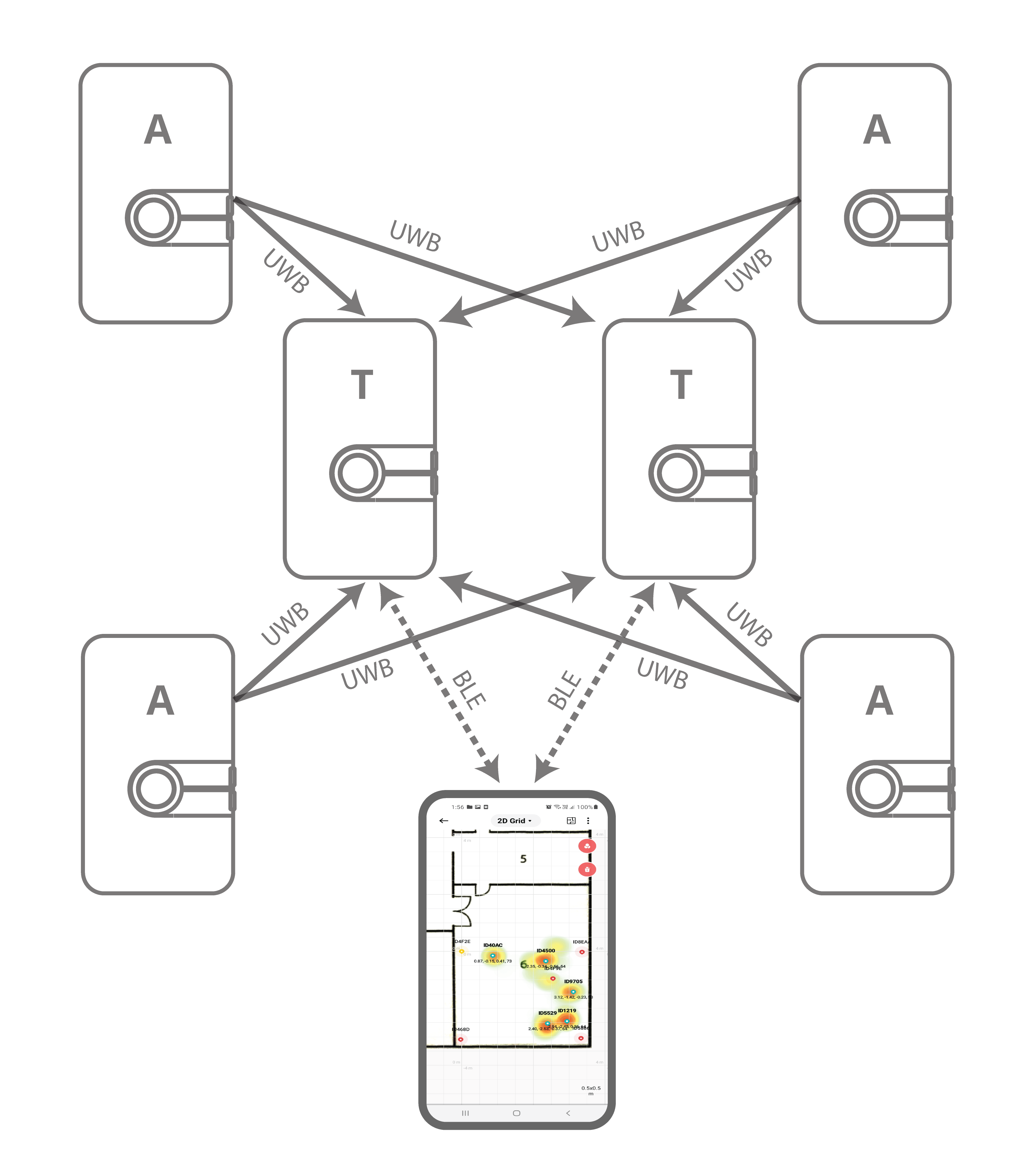
このセットアップは、ダウンリンク到着時間差 (DL-TDoA) テクノロジーを使用した、完全なプライバシーを備えた受信専用モードでの無制限の量のタグのリアルタイム ナビゲーションを示し、タグ位置ナビゲーションを備えた LEAPS Manager アプリケーションを示します。
代表的なアプリケーション: マッピングを使用した屋内ナビゲーション、自律ロボットおよび車両ナビゲーション、別の通信チャネルを通じて送信される位置データを使用した資産追跡。
セットアップ手順
デバイスの電源を ON にします。
静的にマウントされたデバイスはアンカーとして機能し、位置情報をタグに提供します。
移動デバイスは、ナビゲーション モードで構成されたタグとして、受信モードのみで機能し、送信は行われません (GNSS のようなモード)。
タグの数に制限はありません。
LEAPS Manager のデモ セレクターを使用して設定します。
2.1。 LEAPS Manager を開き、メイン ページから Demo Selector を選択します。
2.2。 ダウンリンク TDoA RTLS を選択します。
2.3。 Bluetooth 経由で検出されたデバイスのリストがリストに表示されます。必要に応じて、下にスワイプしてリストを更新します。
2.4。デモに使用するデバイスを選択します。上部の アンカー と タグ は、デモに必要なデバイスの数を示します。
2.5。 SAVE を押して、デバイスを LEAPS RTLS モード、ネットワーク プロファイル 2 (TWR+UL / DL-Data、DL-TDoA をサポート) に設定します。
2.6。 [アンカー設定] ポップアップ ウィンドウが表示され、アンカーの位置を設定するオプションが提供されます。必要に応じて、 手動、自動位置決め、または 現在位置を維持 を選択し、OK を押します。
2.7。デバイスが起動すると、赤い LED が点滅することを目視で確認してください。

デバイスが正常に構成されると、LEAPS Demo Network ウィンドウが構成されたノードのリストとともに表示されます。
Recommended: Use the alarm feature to identify the device, and move it to the correct physical location.
上部のドロップダウン メニューにある グリッド を開くか、位置アイコンをタップしてデバイスとその位置を視覚化します。
LEAPS Manager は プロファイル 2 (TWR+UL / DL-Data、DL-TDoA をサポート) に設定されていますが、自動状態です。したがって、地図上でタグの座標を確認できます。
アプリケーションを使用してノードとネットワークを構成および視覚化する方法の詳細については、LEAPS Manager を参照してください。
高度なセットアップ
高度なセットアップの準備をしてください。ターミナルの能力を活用して、プロのようにデバイスを設定できるようにお手伝いします。以下の手順に従うだけで準備は完了です。
USB-C データ ケーブルを使用して、デバイスの USB-C データ ポート 1 または USB-C データ ポート 2 を PC に接続します。
Putty、Teraterm、Minicom などの希望のターミナル アプリケーション、またはお気に入りのターミナル アプリケーションを使用してシリアル ポートに接続します。ボーレートを 115200 に設定する必要があります。
たとえば、Ubuntu (Linux) で Minicom を使用します。
minicom -b 115200 -D /dev/ttyACM0
シェル コンソールで ダブル Enter を押して、コマンド ライン制御システムにアクセスします。
たとえば、Ubuntu (Linux) では、/dev/ttyACM0 を開き、double Enter を押します。
leaps@leaps:~$ minicom -b 115200 -D /dev/ttyACM0

  Low Energy Accurate Positioning System

  Copyright :  2016-2025 LEAPS
  License   :  Please visit https://www.leapslabs.com/leaps-rtls-license
  Compiled  :  Oct 15 2026 09:42:20 (v1.2.1-4f9295)

  Help      :  ? or help

  FOR DEMO PURPOSE ONLY, NOT FOR SALE.
  DEVICE RUNTIME IS LIMITED TO 48 HOURS. RESET THE DEVICE TO RECOVER IT.

  leaps>
デバイスごとに構成するには、次の手順を実行します。
Optional: Reset devices to default, run the
frstcommand.$ leaps> frst frst okMonitor and wait for the device to reset successfully. Then press double enter to access the command line control system.
Use the
nps 2command to configure profile 2 (supports TWR+UL / DL-Data, DL-TDoA) for each device.$ leaps> nps 2 nps: ok
Use the
niscommand to configure all devices in a network.$ leaps> nis 0x1234 nis: ok
Then, it is neccessary to reset the device need to reset the device to update the configuration. Use the
resetcommand to reset the device.$ leaps> reset reset ok
注釈
この例では、 イニシエーターを有効にしたアンカー、 3 つのアンカー、 タグ を構成します。
各アンカーとタグのモードを設定します。
To configure an anchor with enable initiator, use the
nmicommand to configure a device.$ leaps> nmiその後、デバイスがリセットされ、コマンド ライン制御システムに再度アクセスするには、Enter キーを 2 回押します。
To configure 3 anchors, use the
nmacommand to configure 3 devices to anchor mode, but do not enable initiator.$ leaps> nmaその後、デバイスがリセットされ、コマンド ライン制御システムに再度アクセスするには、Enter キーを 2 回押します。
To configure a tag, use the
nmtcommand to configure a device to tag mode$ leaps> nmtその後、デバイスがリセットされ、コマンド ライン制御システムに再度アクセスするには、Enter キーを 2 回押します。
いずれかのアンカーのクロック基準を設定します。
少なくとも 1 つのアンカーが構成されています。
To configure an anchor with enable clock reference, use the
acs crcommand to configure a device.$ leaps> acs cr 1Then, it is neccessary to reset the device need to reset the device to update the configuration. Use the
resetcommand to reset the device.$ leaps> reset reset ok
各アンカーの実際の位置を設定します。
To get the position use
pgcommand and to set the position usepscommand for each anchor.In this example, we will set up 4 anchors:
leaps> ps 0 7500 1550 ps: ok leaps> pg pg: x:0 y:7500 z:1550 qf:100 leaps>leaps> ps 5500 7500 1550 ps: ok leaps> pg pg: x:5500 y:7500 z:1550 qf:100 leaps>leaps> ps 5500 4000 1500 ps: ok leaps> pg pg: x:5500 y:4000 z:1500 qf:100 leaps>leaps> ps 0 4000 1550 ps: ok leaps> pg pg: x:0 y:4000 z:1550 qf:100 leaps>注釈
The device must be configured to accurately reflect its actual physical location.
Additionally, LEAPS Manager can be used to visualize the devices and their locations.
各タグの設定により、測定に DL-TDoA テクノロジーを使用できるようになります。
To configure, use the
tcs mode 2command for a tag.$ leaps> tcs mode 2 tcs: ok
Then, it is neccessary to reset the device to update the configuration. Use the
resetcommand to reset the device.$ leaps> reset reset ok
By default normal update rate is 0.1 s/ 10 Hz and stationary update rate is 5.0 s/ 0.2 Hz. To increase speed, use
urscommand.
For example, configure normal update rate to 0.1 s/ 10 Hz and, stationary update rate is 0.1 s/ 10 Hz. Run the following command:
$ leaps> urs 1 1
urs: ok
Optional: In steps 5, 6, 7, 8 and, 9 can use the
si(System Information) command to verify whether the mode, profile, and network configurations are correct.
たとえば、4 つのアンカーと 1 つのタグの場合:
mode: ani
panid=x1234
prof=2
cr=1leaps> nps 2 nps: ok leaps> nis 0x1234 nis: ok leaps> acs cr 1 nis: ok leaps> nmi Low Energy Accurate Positioning System Copyright : 2016-2025 LEAPS License : Please visit https://www.leapslabs.com/leaps-rtls-license Compiled : Oct 15 2026 09:42:20 (v1.2.1-4f9295) Help : ? or help FOR DEMO PURPOSE ONLY, NOT FOR SALE. DEVICE RUNTIME IS LIMITED TO 48 HOURS. RESET THE DEVICE TO RECOVER IT. leaps> si [000013.974 INF] release: LEAPS RTLS v1.2.1-4f9295 (fira) [000013.975 INF] sys: main main_ver=x02070101 cfg_ver=x01040000 batt=empty:0mV:NoCharger board=LC14_B prod=LC14_B pwr_cnt=0 rst_cnt=2 [000013.976 INF] uwb: ch9 prf64 plen128 pac8 txcode11 rxcode11 baud6800 phrmodeext phrratestd sfdtypeieee4a sfdto129 stsmodeoff stslen64 pdoamodem0 [000013.976 INF] uwb: tx_pwr=x34/xC6C6C6C6 sts:shr:phr:data=22.6:22.6:22.6:22.6[dB] cpl=FCC/ETSI pgcnt=236 temp=25 [000013.977 INF] uwb: lna=1 pa=0 rf1=1 rf2=0 xtaltrim=32 tx_delay=16422 rx_delay=16422 [000013.980 INF] uwb: panid=x1234 panid_mask=xFFFF zone=255 addr=xDECAED5BC8B1468D [000013.998 INF] mode: ani (act,-) [000013.999 INF] uwbmac: connected prof=2 (manual) [000013.999 INF] uwbmac: bh disconnected [000014.000 INF] cfg: sync=0 fwup=1 ble=1 leds=1 init=1 uab=1 bh=auto bh_stat=off cr=1 upd_rate_stat=30 label=ID468D [000014.023 INF] enc: off [000014.024 INF] ble: addr=F3:D9:66:75:93:EB leaps>
mode: an
panid=x1234
prof=2leaps> nps 2 nps: ok leaps> nis 0x1234 nis: ok leaps> nma Low Energy Accurate Positioning System Copyright : 2016-2025 LEAPS License : Please visit https://www.leapslabs.com/leaps-rtls-license Compiled : Oct 15 2026 09:42:20 (v1.2.1-4f9295) Help : ? or help FOR DEMO PURPOSE ONLY, NOT FOR SALE. DEVICE RUNTIME IS LIMITED TO 48 HOURS. RESET THE DEVICE TO RECOVER IT. leaps> si [000010.749 INF] release: LEAPS RTLS v1.2.1-4f9295 (fira) [000010.750 INF] sys: main main_ver=x02070101 cfg_ver=x01040000 batt=empty:0mV:NoCharger board=LC14_B prod=LC14_B pwr_cnt=0 rst_cnt=2 [000010.751 INF] uwb: ch9 prf64 plen128 pac8 txcode11 rxcode11 baud6800 phrmodeext phrratestd sfdtypeieee4a sfdto129 stsmodeoff stslen64 pdoamodem0 [000010.751 INF] uwb: tx_pwr=x34/xCECECECE sts:shr:phr:data=23.4:23.4:23.4:23.4[dB] cpl=FCC/ETSI pgcnt=229 temp=25 [000010.752 INF] uwb: lna=1 pa=0 rf1=1 rf2=0 xtaltrim=32 tx_delay=16423 rx_delay=16423 [000010.755 INF] uwb: panid=x1234 panid_mask=xFFFF zone=255 addr=xDECAE4F84AA54F9E [000010.770 INF] mode: an (act,-) [000010.771 INF] uwbmac: connected prof=2 (manual) [000010.771 INF] uwbmac: bh disconnected [000010.798 INF] cfg: sync=0 fwup=1 ble=1 leds=1 init=0 uab=1 bh=auto bh_stat=off cr=0 upd_rate_stat=30 label=ID4F9E [000010.798 INF] enc: off [000010.798 INF] ble: addr=D8:70:8B:16:3B:EE leaps>
mode: an
panid=x1234
prof=2leaps> nps 2 nps: ok leaps> nis 0x1234 nis: ok leaps> nma Low Energy Accurate Positioning System Copyright : 2016-2025 LEAPS License : Please visit https://www.leapslabs.com/leaps-rtls-license Compiled : Oct 15 2026 09:42:20 (v1.2.1-4f9295) Help : ? or help FOR DEMO PURPOSE ONLY, NOT FOR SALE. DEVICE RUNTIME IS LIMITED TO 48 HOURS. RESET THE DEVICE TO RECOVER IT. leaps> si [000005.120 INF] release: LEAPS RTLS v1.2.1-4f9295 (fira) [000005.120 INF] sys: main main_ver=x02070101 cfg_ver=x01040000 batt=empty:0mV:NoCharger board=LC14_B prod=LC14_B pwr_cnt=0 rst_cnt=2 [000005.121 INF] uwb: ch9 prf64 plen128 pac8 txcode11 rxcode11 baud6800 phrmodeext phrratestd sfdtypeieee4a sfdto129 stsmodeoff stslen64 pdoamodem0 [000005.122 INF] uwb: tx_pwr=x34/xCECECECE sts:shr:phr:data=23.4:23.4:23.4:23.4[dB] cpl=FCC/ETSI pgcnt=238 temp=25 [000005.123 INF] uwb: lna=1 pa=0 rf1=1 rf2=0 xtaltrim=32 tx_delay=16417 rx_delay=16417 [000005.126 INF] uwb: panid=x1234 panid_mask=xFFFF zone=255 addr=xDECA229121E05886 [000005.140 INF] mode: an (act,-) [000005.141 INF] uwbmac: connected prof=2 (manual) [000005.142 INF] uwbmac: bh disconnected [000005.169 INF] cfg: sync=0 fwup=1 ble=1 leds=1 init=0 uab=1 bh=auto bh_stat=off cr=0 upd_rate_stat=30 label=ID5886 [000005.169 INF] enc: off [000005.170 INF] ble: addr=FD:3F:4A:2F:BD:F0 leaps>
mode: an
panid=x1234
prof=2leaps> nps 2 nps: ok leaps> nis 0x1234 nis: ok leaps> nma Low Energy Accurate Positioning System Copyright : 2016-2025 LEAPS License : Please visit https://www.leapslabs.com/leaps-rtls-license Compiled : Oct 15 2026 09:42:20 (v1.2.1-4f9295) Help : ? or help FOR DEMO PURPOSE ONLY, NOT FOR SALE. DEVICE RUNTIME IS LIMITED TO 48 HOURS. RESET THE DEVICE TO RECOVER IT. leaps> si [000010.064 INF] release: LEAPS RTLS v1.2.1-4f9295 (fira) [000010.064 INF] sys: main main_ver=x02070101 cfg_ver=x01040000 batt=empty:0mV:NoCharger board=LC14_B prod=LC14_B pwr_cnt=0 rst_cnt=2 [000010.066 INF] uwb: ch9 prf64 plen128 pac8 txcode11 rxcode11 baud6800 phrmodeext phrratestd sfdtypeieee4a sfdto129 stsmodeoff stslen64 pdoamodem0 [000010.067 INF] uwb: tx_pwr=x34/xEEEEEEEE sts:shr:phr:data=26.5:26.5:26.5:26.5[dB] cpl=FCC/ETSI pgcnt=245 temp=25 [000010.068 INF] uwb: lna=1 pa=0 rf1=1 rf2=0 xtaltrim=32 tx_delay=16427 rx_delay=16427 [000010.070 INF] uwb: panid=x1234 panid_mask=xFFFF zone=255 addr=xDECA7A20DFE04F2E [000010.090 INF] mode: an (act,-) [000010.091 INF] uwbmac: connected prof=2 (manual) [000010.091 INF] uwbmac: bh disconnected [000010.092 INF] cfg: sync=0 fwup=1 ble=1 leds=1 init=0 uab=1 bh=auto bh_stat=off cr=0 upd_rate_stat=30 label=ID4F2E [000010.113 INF] enc: off [000010.114 INF] ble: addr=C8:D9:F3:F1:7D:CE leaps>
mode: tn
panid=x1234
prof=2leaps> nps 2 nps: ok leaps> nis 0x1234 nis: ok leaps> tcs mode 2 tcs: ok leaps> urs 1 1 urs: ok leaps> nmt Low Energy Accurate Positioning System Copyright : 2016-2025 LEAPS License : Please visit https://www.leapslabs.com/leaps-rtls-license Compiled : Oct 15 2026 09:42:20 (v1.2.1-4f9295) Help : ? or help FOR DEMO PURPOSE ONLY, NOT FOR SALE. DEVICE RUNTIME IS LIMITED TO 48 HOURS. RESET THE DEVICE TO RECOVER IT. leaps> si [000081.906 INF] release: LEAPS RTLS v1.2.1-4f9295 (fira) [000081.906 INF] sys: main main_ver=x02070101 cfg_ver=x01040000 batt=empty:0mV:NoCharger board=LC14_B prod=LC14_B pwr_cnt=0 rst_cnt=2 [000081.907 INF] uwb: ch9 prf64 plen128 pac8 txcode11 rxcode11 baud6800 phrmodeext phrratestd sfdtypeieee4a sfdto129 stsmodeoff stslen64 pdoamodem0 [000081.908 INF] uwb: tx_pwr=x34/xC6C6C6C6 sts:shr:phr:data=22.6:22.6:22.6:22.6[dB] cpl=FCC/ETSI pgcnt=232 temp=25 [000081.909 INF] uwb: lna=1 pa=0 rf1=1 rf2=0 xtaltrim=32 tx_delay=16425 rx_delay=16425 [000081.912 INF] uwb: panid=x1234(sys_cfg=x1234) panid_mask=xFFFF addr=xDECA2DA03CD01219 [000081.928 INF] mode: tn (act,rtdoa,np,le) [000081.929 INF] uwbmac: connected prof=2 (manual) [000081.929 INF] uwbmac: bh disconnected [000081.955 INF] cfg: sync=0 fwup=1 ble=1 leds=1 le=1 lp=0 uab=1 stat_det=1 (sens=2) mode=2 upd_rate_norm=1 upd_rate_stat=1 label=ID1219 [000081.956 INF] enc: off [000081.956 INF] ble: addr=CF:8F:04:42:CF:84 leaps>
Optional: To see a list of anchors in range and connected to the device, use the
lacommand.
For example on an anchor:
leaps> la
[000102.972 INF] AN: cnt=4 seq=x09
[000102.973 INF]     0) id=468D seat=0 clk_lvl=0 seens=0 rssi=-127 cl=0000000F nbr=0000000F pos=0.00:7.50:1.55 rate=0
[000102.973 INF]     1) id=4F2E seat=2 clk_lvl=1 seens=162 rssi=-55 cl=0000000F nbr=00000000 pos=0.00:4.00:1.55 rate=98
[000102.974 INF]     2) id=4F9E seat=1 clk_lvl=1 seens=181 rssi=-63 cl=0000000F nbr=00000000 pos=5.50:7.50:1.55 rate=99
[000102.975 INF]     3) id=5886 seat=3 clk_lvl=1 seens=128 rssi=-68 cl=0000000F nbr=00000000 pos=5.50:4.00:1.50 rate=99
[000102.976 INF]
leaps>
Once all configurations are complete, check the position of the Tag using the
lescommand.
For example on a Tag, the position will update and display real-time:
leaps> les
leaps> POS[2.66,4.36,0.00,100] 468D[0.00,7.50,1.55,100]=0.00 4F9E[5.50,7.50,1.55,100]=0.09 4F2E[0.00,4.00,1.55,100]=-1.47 5886[5.50,4.00,1.50,100]=-1.22
POS[2.65,4.36,0.00,100] 468D[0.00,7.50,1.55,100]=0.00 4F9E[5.50,7.50,1.55,100]=0.11 4F2E[0.00,4.00,1.55,100]=-1.46 5886[5.50,4.00,1.50,100]=-1.20
POS[2.66,4.33,0.00,100] 468D[0.00,7.50,1.55,100]=0.00 4F9E[5.50,7.50,1.55,100]=0.10 4F2E[0.00,4.00,1.55,100]=-1.50 5886[5.50,4.00,1.50,100]=-1.23
POS[2.66,4.33,0.00,100] 468D[0.00,7.50,1.55,100]=0.00 4F9E[5.50,7.50,1.55,100]=0.10 4F2E[0.00,4.00,1.55,100]=-1.50 5886[5.50,4.00,1.50,100]=-1.24
POS[2.65,4.35,0.00,100] 468D[0.00,7.50,1.55,100]=0.00 4F9E[5.50,7.50,1.55,100]=0.12 4F2E[0.00,4.00,1.55,100]=-1.48 5886[5.50,4.00,1.50,100]=-1.21
POS[2.65,4.36,0.00,100] 468D[0.00,7.50,1.55,100]=0.00 4F9E[5.50,7.50,1.55,100]=0.11 4F2E[0.00,4.00,1.55,100]=-1.47 5886[5.50,4.00,1.50,100]=-1.21
...
これで、システムは正常にセットアップされ、構成されました。楽しく使ってください!
Here are some tips for fixing some issues related to the installation process:
Please check the version. We recommend using the latest official version found under リリース.
When Bluetooth and the LEDs are both disabled, users may erroneously perceive the board as non-functional. In this scenario, the quickest solution is to perform a factory reset (frst) command via the shell.
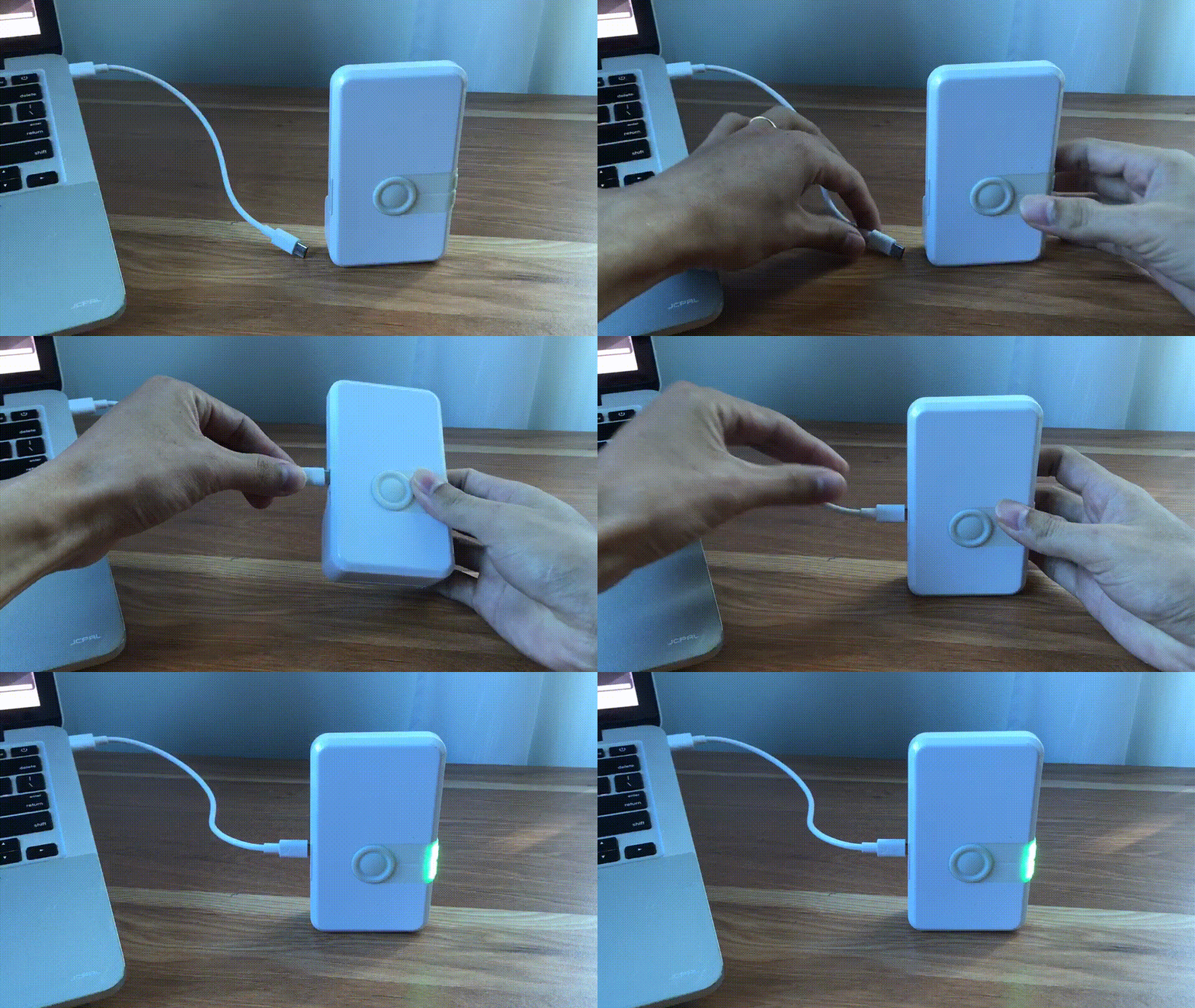
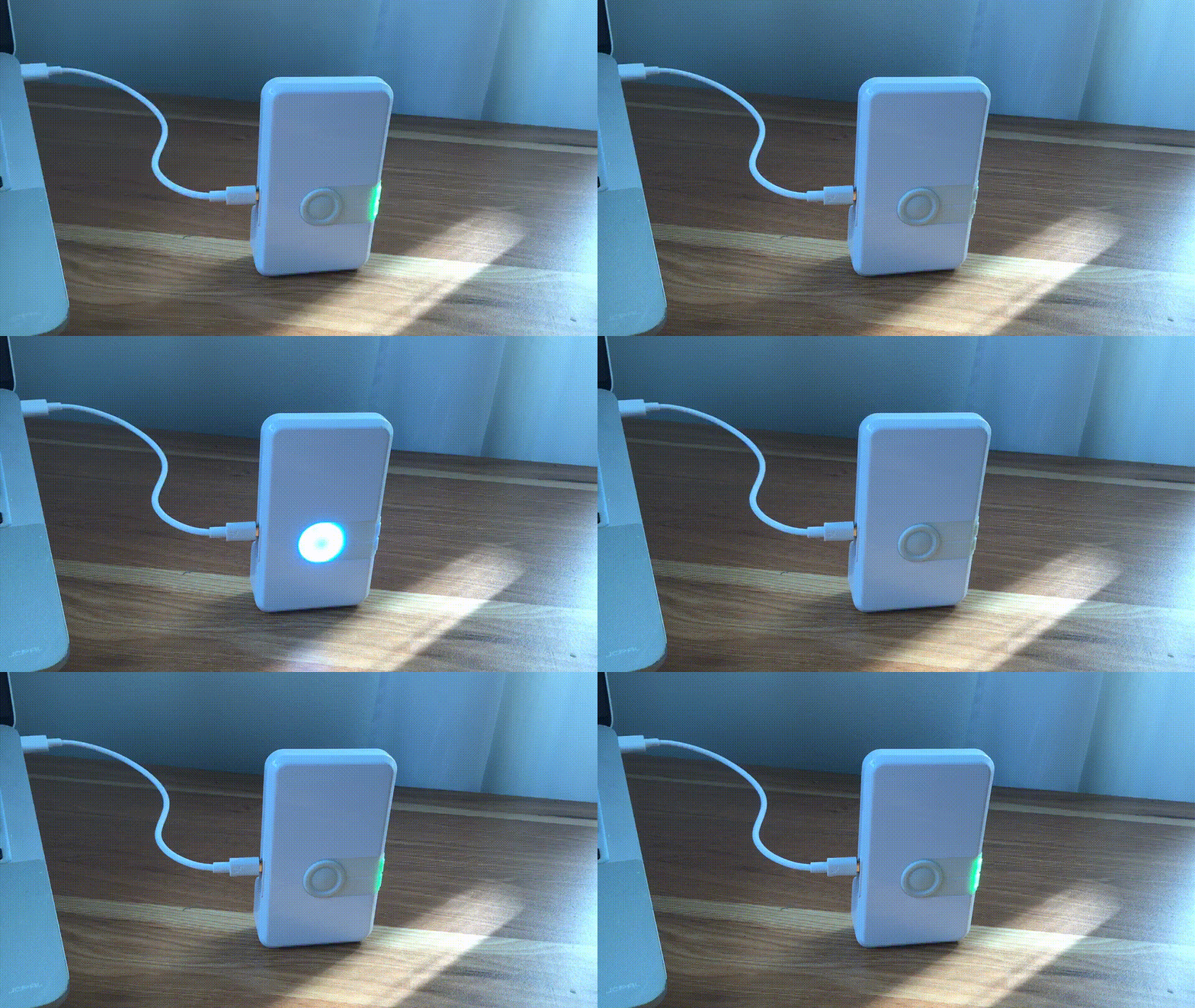
デバイスの現在の状態がわからない場合は、LEAPS Manager のデモ セレクターの デバイスをデフォルトにリセット 機能を使用します。次のGIF画像を参照してください。
注釈
ダウンリンク TDoA RTLS デモの位置データは、別の通信チャネルを通じて送信されます。
弊社製品に関するご意見やご質問については、LEAPS フォーラム にアクセスすることをお勧めします。
既知の制限と問題リストの詳細については、セクション リリース を参照してください。